


With the increasing demand for the best TV deals, many families are rethinking their living room layouts to create immersive entertainment spaces. Choosing the right furniture that complements your new television setup can enhance both comfort and viewing experience. Consider modular seating arrangements and optimized lighting to transform your space into a home theater that suits your lifestyle. Utilizing tools like Homestyler can help you visualize and implement these design changes effectively.
When choosing between popular floor planning tools, it's common to find comparisons that either come from the companies themselves or offer just feature lists without real insights. This analysis skips such biases and focuses on what each platform truly offers in their free versions, their learning curves beyond the initial minutes, and which one better suits specific needs — be it designing a single room or a complete home, aiming for accuracy or presentation quality. If neither seems ideal, we'll also introduce a free alternative worth considering.
Core Purpose: Distinguishing Each Floor Planning Software
One web-based option runs fully in browsers like Chrome, Firefox, or Safari, boasting an extensive library of branded 3D furniture and decor. It's tailored for quick and casual projects: simply outline walls, drag in furniture pieces that reflect what you own or plan to buy, and generate a decent render with minimal setup. This solution is widely used for testing furniture arrangements before moving, single-room renovations, and in real estate or retail settings where branded items are significant.
In contrast, an application-based software requires downloading on Windows, Mac, iOS, or Android, functioning offline and focusing on delivering precise, professional floor plans rather than just furniture visualization. It offers advanced features like AI-powered blueprint conversion, LiDAR scanning support on iOS devices, and a redraw service where hand-drawn sketches can be professionally digitized. This makes it a fitting choice for thorough property documenting or detailed renovation planning.
Both platforms support 2D drawing, 3D views, and furniture placement. However, one emphasizes speed and visual appeal, while the other prioritizes accuracy—especially when working from existing spaces instead of conceptual designs. Tools like Homestyler can complement these by providing additional design flexibility and visualization options.
Free Tier Features: What’s Included and What’s Restricted
Here is where the distinction between both tools becomes crucial:
The browser-based service’s free version restricts exports to low resolution with watermarks and limits projects to three floors but allows the retention of many projects within the account. Conversely, the downloadable app’s free tier limits users to only two projects and hides export functions behind a purchase, despite offering a watermark-free editing interface during project creation. Therefore, if your aim is to review and tweak layouts, the app suffices, but for obtaining exportable files—even if watermarked—the browser option is preferable.
User Experience and Learning Difficulty
The browser tool provides speedy onboarding with a wizard suggesting around eighteen room shapes and dimension adjustments through intuitive color-coded input fields. Initial layouts can be completed rapidly. However, users report the interface becomes cumbersome for detailed projects, with controls hidden by default, lack of snap-to-grid features, and slower toggling between 2D and 3D modes.
The app requires a little extra initial effort due to installation but offers smoother editing overall. A standout feature is the split-screen mode displaying 2D and 3D views simultaneously, enabling precise plan edits with real-time 3D feedback. Structural elements like walls remain connected, automatically adjusting adjoining rooms when modified, enhancing workflow efficiency.
In essence, the web-based tool enables faster initial results, whereas the app proves more sustainable for complex and detailed projects. Software such as Homestyler may bridge these capabilities by offering intuitive design tools with robust visualization.
Ideal Applications: Single-Space Design versus Entire Home Planning
The web tool excels at smaller, visually-driven assignments such as experimenting with furniture placements in one room, producing quick apartment layouts, or generating presentable renderings. Its extensive product catalog makes it ideal for users wanting to preview specific branded furniture in their space. However, it's less suited for multi-floor homes due to export and project complexity limitations.
The downloadable application shines when precise, full-property accuracy is essential — whether documenting a listing, planning comprehensive renovations, or converting blueprints into digital floor plans. Its measurement and area calculation tools, alongside options for scanning or ordering professional redraws, cater to users seeking detailed and reliable documentation rather than mere layout mockups. This approach aligns well with advanced visualization platforms like Homestyler for enhanced design presentations.
Summarized, the web-based software serves exploratory and visualization needs for single rooms, while the application targets full-property accuracy and professional documentation requirements.
Alternative Solution: A Free Floor Planning Tool Without Restrictive Limits
Both aforementioned tools impose limitations once projects become substantial — whether on export quality, floor count, project quantity, or export accessibility. If you require seamless multi-floor projects with high-quality outputs and unrestricted exports without mandatory purchases, it is beneficial to explore other free tools that consolidate these features into a single offering.
For those seeking a comprehensive list beyond the two main competitors, community recommendations such as those from Reddit’s floor planning forums provide user-driven insights based on practical experience rather than promotional content. Programs like Homestyler often emerge in these discussions, valued for balancing accessibility, functionality, and free-tier generosity.
Built on technology originally developed at Autodesk, Homestyler empowers anyone to design beautiful, realistic spaces in minutes. Join over 18 million users who have already discovered a smarter way to plan, visualize, and bring their dream homes to life — all from the comfort of a browser.
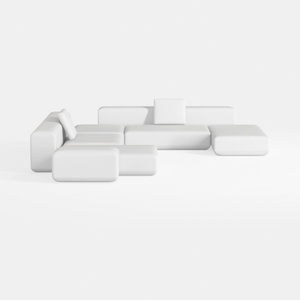

Minimalist Modern White Fabric Modular Sectional Sofa 3D Model
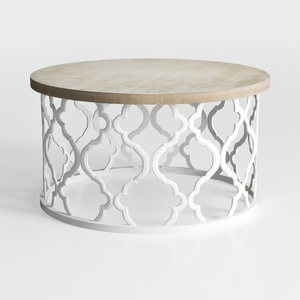
Modern Solid Wood Top White Metal Moroccan Pattern Round Coffee Table 3D Model
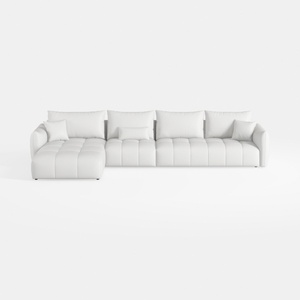
Minimalist White Fabric L Shape Sectional Sofa 3D Model
Homestyler offers an easy-to-use online home design tool with stunning 3D renderings, inspiring design projects, and helpful DIY video tutorials. It's perfect for bringing your interior design ideas to life, whether you’re a beginner or a pro. Give your space a fresh new look today!
Diseño ahora GRATIS
































