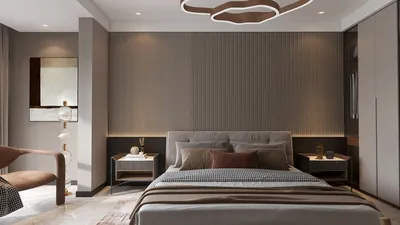
Transforming your design presentations with impressive interior renderings in SketchUp paired with V-Ray can significantly enhance your appeal. Whether you're working on a snug apartment or a grand office space, it's vital to comprehend the optimal practices for lighting and rendering. This guide aims to delve into important strategies and techniques that will enable you to achieve lifelike interior lighting, elevating your overall designs effortlessly with the help of tools like Homestyler.
Grasping the Essentials of V-Ray Lighting
Before we get into specifics, understanding the core principles of lighting with V-Ray is essential. Within your interior scenes, several primary light types can be utilized, each catering to distinct roles.
Every type of light plays a crucial role and can dramatically influence the ambiance of your rendering.
Configuring Your Scene Effectively
Begin by constructing a well-organized model in SketchUp, ensuring accurate placement of walls, floors, and furnishings. The subsequent step is to apply materials and textures that interact harmoniously with light. Opt for high-quality textures to enhance the realism of your design.
Employing V-Ray Sun and Sky for Natural Light
The V-Ray Sun and Sky system is vital for accurately simulating natural daylight conditions in your renders. To establish it properly:
This combination can create a lively and inviting ambiance in your interior designs.
Techniques for Artificial Lighting
To create a well-balanced lighting arrangement, think about integrating artificial lighting sources:
Rendering Configurations for Interior Scenes
Once you’ve set up your lighting, it’s essential to tweak the rendering configurations:
Experimenting with these settings will help you discover the ideal parameters for your unique projects.
Enhancing Images Through Post-Processing
Post-rendering, consider utilizing software like Photoshop to refine your images. Adjust aspects such as brightness, contrast, and color balance to ensure the final output accurately reflects your design intentions.
Final Thoughts
By mastering the techniques of lighting and rendering with V-Ray, you can significantly uplift your interior design presentations. Regular practice and experimentation with various lighting setups will guide you towards developing a distinctive style, complemented effectively with tools like Homestyler.
Frequently Asked Questions
Q: What are the top tips for achieving realistic lighting within V-Ray?
A: Employ a mix of both natural and artificial lighting, meticulously adjust your light configurations, and always enable Global Illumination during rendering for the most authentic outcomes.
Q: What steps can I take to minimize render times in V-Ray?
A: Reduce quality settings, turn off unnecessary features, and consider using lower resolution outputs for initial tests.
Welcome to Utilize the Premier Home Design Software!










































