


Are you aiming to elevate your 3D design process? Mastering the importation of models into Homestyler is essential. Homestyler offers robust modeling and texturing functionalities, making it suitable for both novices and experienced designers alike. In this guide, we will outline the straightforward steps for seamlessly importing your models.
Step 1: Preparing Your Model
Before importing your model into Homestyler, make sure that it conforms to a compatible file format. Homestyler accepts a variety of formats, such as OBJ, FBX, and STL. If your model doesn’t meet these requirements, you may need to convert it using another 3D modeling software to ensure optimal performance and compatibility.
Step 2: Open Homestyler
Start by launching Homestyler on your device. Once the program is up, you can either begin a new project or access an existing one. To import your model, go to the ‘Import’ option located within the file menu at the top of the interface.
Step 3: Importing Your Model
Hit the ‘Import’ button, choose your model file from your computer, and modify any necessary settings for the import. Homestyler may offer options such as scaling and centering the model; be sure to select the appropriate settings tailored to your project requirements. This meticulous approach can significantly enhance your modeling experience.
Step 4: Verifying Your Import
After your model has been imported, take a moment to review it in the viewport. Check for any discrepancies such as scale, orientation, or texture issues that may have arisen during the import phase. This verification is crucial to ensure a seamless experience with Homestyler and to get your project off to a successful start.
FAQ
Q: What file formats can I use when importing models into Homestyler? A: Homestyler supports several formats including OBJ, FBX, and STL, making it adaptable for various design applications.
Q: Is it necessary to prepare my model in separate software before importing? A: Absolutely, if your model isn’t in a compatible format, you’ll need to convert it using another 3D modeling tool to facilitate a smooth integration into Homestyler.


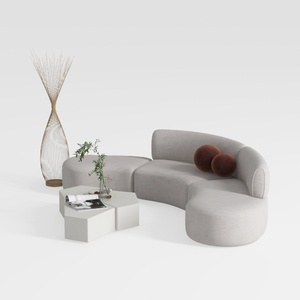
Minimalist Fabric Curved Sectional Sofa 3D Model

Minimalist Fabric Loveseat Sofa with Black Metal Legs 3D Model
Transform your home with Homestyler! This user-friendly online design platform offers powerful design tools, stunning 3D renderings, and a wealth of DIY video tutorials. Unleash your creativity and explore endless interior design possibilities today—perfect for both beginners and seasoned designers!
Diseño ahora GRATIS
































